# Add Orvelt to your website
URL: /docs/collect/website
The **website form** brings Orvelt's opinion form, including your questions, onto your own website. Customers type or [speak](/docs/collect/voice-opinions) their opinion without leaving your site. The best places for it are moments when customers have just finished something: an **order confirmation page**, a **booking confirmation**, or a **Give feedback** button in your footer.

**You don't need a developer** if your site is built with Shopify, Wix, Squarespace, WordPress, Webflow, or a similar website builder. Copy one block, change one value, and paste it into your site.
## Choose how the form appears [#choose-how-the-form-appears]
**Feedback button**
Your page shows a **Give feedback** button. Selecting it opens the form in a pop-up window over your page. Best for footers, menus, or account pages, where the form shouldn't take up space until someone wants it.
**Form on the page**
The form sits right inside your page, like any other section. Best for confirmation pages, where you want customers to see it immediately.

## Before you paste: three things to check [#before-you-paste-three-things-to-check]
### Your project is published [#your-project-is-published]
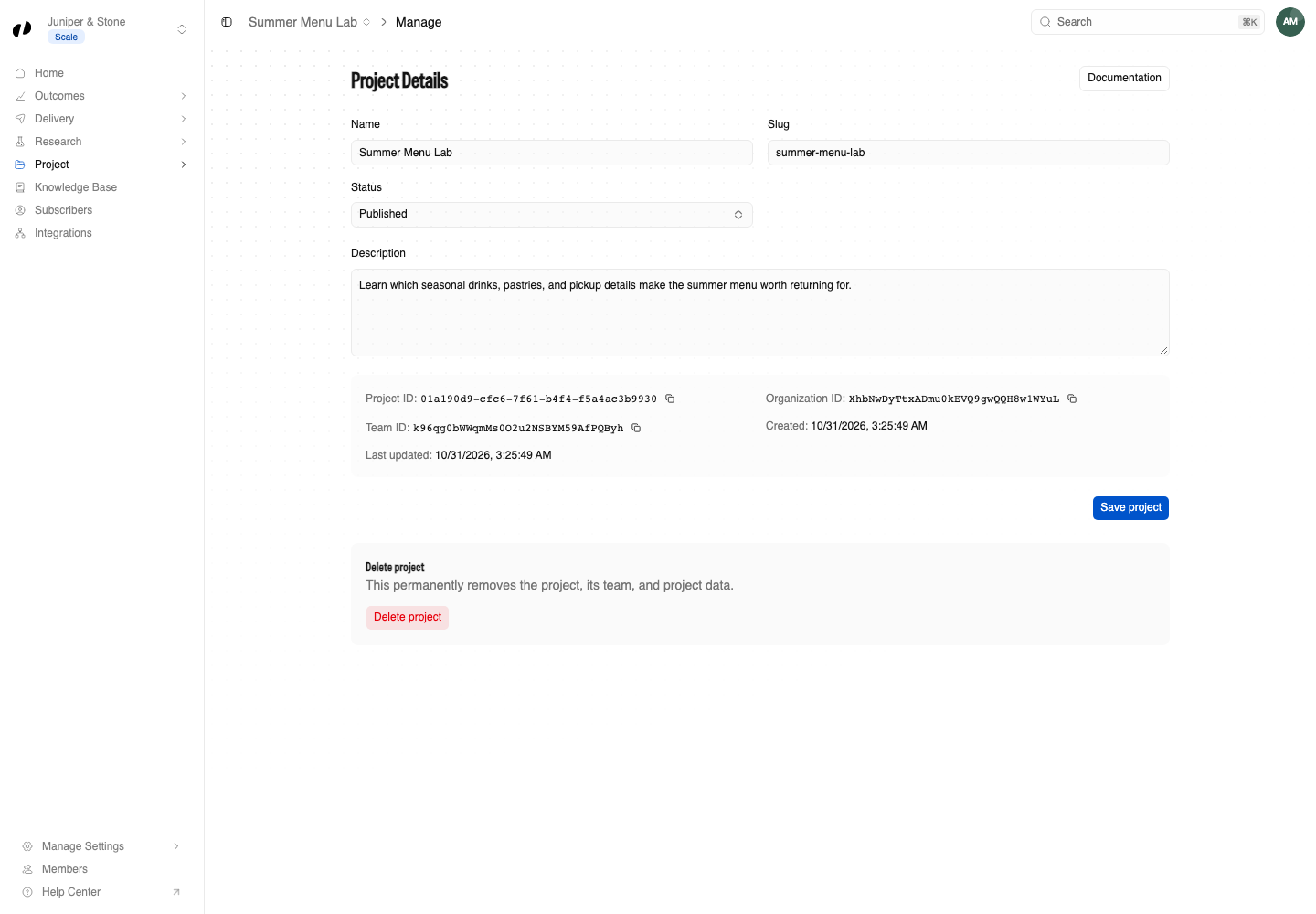
The form collects opinions for one project. Open the project, choose **Project → Manage**, and check its **Status** is **Published**. [Project settings](/docs/projects/settings)
### Copy your Project ID [#copy-your-project-id]
On the same **Project → Manage** page, find **Project ID** and select its copy button. It's a long code like `0194f3a2-7c1e-7b55-9d1a-2f6c8e4b1a90`. You'll paste it into the block below.
### Decide which websites may show it [#decide-which-websites-may-show-it]
By default, any website can show your form. You can limit it to your own site under **Delivery → Embedded form → Allowed origins**. If you're not sure, leave it empty for now. [Allowed origins](/docs/collect/website/allowed-origins)
## The block to paste [#the-block-to-paste]
Copy the block for the option you chose. Then replace `PASTE-YOUR-PROJECT-ID-HERE` with your Project ID, keeping the quote marks around it. That's the only change you need to make.
**Feedback button**
```html title="Paste where the button should appear"
```
You can change the words **Give feedback** to anything you like, such as "Tell us how we did".
**Form on the page**
```html title="Paste where the form should appear"
```
### Want private feedback instead of public reviews? [#want-private-feedback-instead-of-public-reviews]
Change `'public'` to `'private'`. Private feedback is only visible to your business and never appears on your Storefront. A form for a [private project](/docs/projects/settings#make-a-project-private) always collects private feedback, whichever value you use.
| `visibility` value | What customers write |
| --- | --- |
| `'public'` | Public reviews that can appear on your Storefront. |
| `'private'` | Private feedback only your business can read. |
> **Where's the code in Orvelt Business?**
>
>
> **Delivery → Embedded form → Embed code** shows a version of this code written for developers who build their site with JavaScript tools. If you use a website builder, use the block on this page instead. It does the same thing and can be pasted anywhere HTML is allowed.
## Paste it into your website [#paste-it-into-your-website]
Pick your website builder for step-by-step instructions:
[Shopify](/docs/collect/website/shopify): Add a Custom Liquid section in the theme editor.
[Wix](/docs/collect/website/wix): Add an Embed HTML element in the Wix editor.
[Squarespace](/docs/collect/website/squarespace): Add a Code Block to any page.
[WordPress](/docs/collect/website/wordpress): Add a Custom HTML block in the block editor.
[Webflow](/docs/collect/website/webflow): Add a Code Embed element in the Designer.
**Using something else?** Look for a block or element called *HTML*, *Embed*, *Code*, or *Custom code* in your website builder, add it where you want the form, and paste the block into it. If your site was built by a developer, send them this page and the [developer guide](/docs/developers/collect/website-embed).
## After you paste [#after-you-paste]
[Test the form](/docs/collect/website/test-the-form) with a real submission before you tell customers about it.
## How customers sign in [#how-customers-sign-in]
Customers already signed in to Orvelt post as themselves. Everyone else enters their name and email and confirms a code sent to that email before writing, so you always know who you're hearing from. It all happens inside the form; your website doesn't handle any sign-ins or passwords.
## Match your brand [#match-your-brand]
Set the form's accent color, rounded corners, and dark mode by adding a few lines to the same block. [Customize the form](/docs/collect/website/customize)
Attaching an order number or reacting when someone submits needs a developer. [Developer guide: Website embed](/docs/developers/collect/website-embed)