# Website embed
URL: /docs/developers/collect/website-embed
The best moment to ask for feedback is right after the experience: on an order confirmation page, after a booking, or behind a **Give feedback** button. The embedded form brings Orvelt's opinion form and your questions to that moment on your own website. It needs only your public project ID: no Business API key, session endpoint, or website backend. Orvelt runs a separate visitor session inside the iframe.

## Prepare the project [#prepare-the-project]
### Publish and allow your website [#publish-and-allow-your-website]
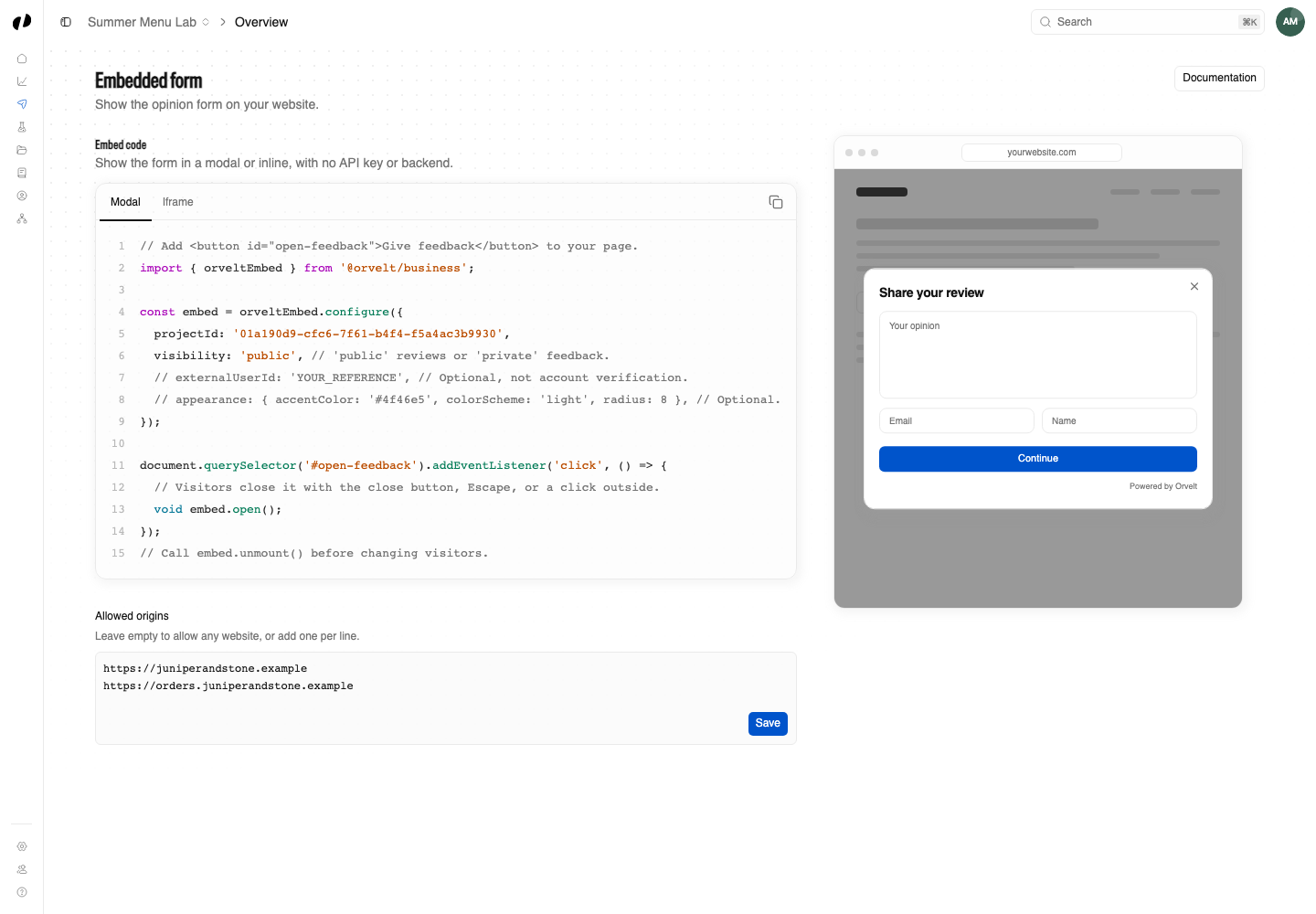
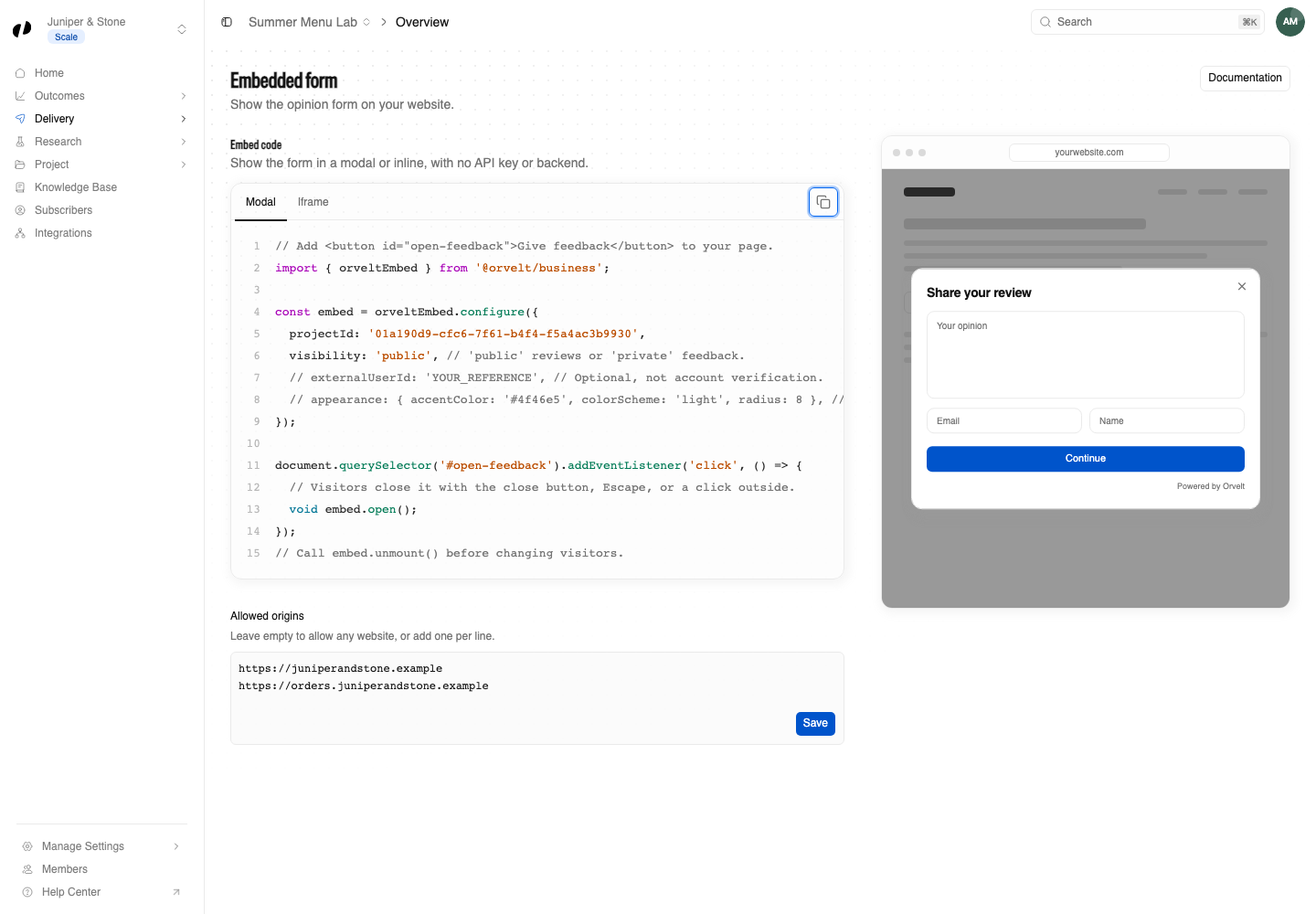
Publish your project in Orvelt Business. All website origins are allowed by default. To restrict embedding, add exact origins under **Delivery → Embedded form**, such as `https://shop.example.com`; once you add origins, add each development origin separately, including its port. Clear the list to allow all origins again. Replace `PROJECT_UUID` below with your published project's UUID.
### Allow Orvelt in your Content Security Policy [#allow-orvelt-in-your-content-security-policy]
If your website sends a Content Security Policy (CSP), add `https://orvelt.com` to `frame-src`. When you use the script tag, also add `https://unpkg.com` to `script-src`, and apply your CSP nonce to the inline script if your policy uses nonces. With no CSP, there is nothing to add.
### Allow voice opinions [#allow-voice-opinions]
The SDK adds `allow="microphone"` to the iframe. Use HTTPS (or localhost for development). If your website sends a `Permissions-Policy` header, allow the form's origin, for example `microphone=(self "https://orvelt.com")`; a restrictive policy such as `microphone=()` blocks recording. Update older SDK installations to pick up microphone delegation.
Customers select the microphone in the opinion editor; permission is requested only when recording starts, after any email confirmation, and they can edit the transcript before continuing. To help transcription spell your names, add **Business terms** on **Knowledge** in Orvelt Business: up to 100 terms of 100 characters each, shared by all the business's projects on the storefront and in embeds. Every recording sends the current terms to Mistral's Voxtral Mini Transcribe 3 as spelling context. They are not returned to your website.
## Copy the snippet from Orvelt Business [#copy-the-snippet-from-orvelt-business]
**Delivery → Embedded form → Embed code** shows a ready-made snippet with your project ID filled in. **Modal** is first and selected by default; choose **Iframe** if you want the form inside your page, then select **Copy code**. The snippet uses the npm package; the script-tag version below works the same way without a bundler. Website-builder users can follow the [no-code guides](/docs/collect/website) instead.
## Install in your frontend [#install-in-your-frontend]
### Load the script from UNPKG (recommended) [#load-the-script-from-unpkg-recommended]
The SDK creates the iframe, applies its sandbox attributes, resizes it as the form changes, and handles completion callbacks.
```html
```
Keep the URL without a version. UNPKG then serves the latest release, so your website picks up new form features and fixes with nothing to redeploy, once CDN and browser caches refresh. Use `visibility: 'private'` for private feedback, and pass `origin`, such as `http://localhost:3000`, for staging or local development.
For Turbo, unmount on `turbo:before-cache` and `turbo:before-render`, then configure the form and bind the new button on `turbo:load`.
### Install the npm package [#install-the-npm-package]
With a bundler you can install the same SDK from npm instead. Your lockfile then pins the version, so updates arrive only when you run `npm update @orvelt/business`; choose this only when you need to control when updates arrive.
```sh
npm install @orvelt/business
```
```ts
import { orveltEmbed } from '@orvelt/business';
const embed = orveltEmbed.configure({
projectId: 'PROJECT_UUID',
visibility: 'public',
});
document.querySelector('#open-feedback')?.addEventListener('click', () => {
void embed.open();
});
```
The npm export `orveltEmbed` and the script's `OrveltEmbed` global are the same object, with the same options and methods.
### React and Next.js [#react-and-nextjs]
For a form inside your page instead of a feedback button, mount in an effect and unmount during cleanup. For the Next.js App Router, add `'use client'` at the top; configuration is SSR-safe, so mount only in browser effects or events.
```tsx
import { useEffect, useRef } from 'react';
import { orveltEmbed } from '@orvelt/business';
export function OpinionForm() {
const slot = useRef(null);
useEffect(() => {
if (!slot.current) return;
const embed = orveltEmbed.configure({ projectId: 'PROJECT_UUID' });
void embed.mount(slot.current).catch(() => console.error('Unable to open the opinion form'));
return () => embed.unmount();
}, []);
return ;
}
```
## Choose how to show the form [#choose-how-to-show-the-form]
Both display methods use the same configuration and callbacks.
| Method | Use it when | How visitors close it |
| --- | --- | --- |
| **Modal**: `embed.open()` | Orvelt shows the form in a modal, for example behind a **Give feedback** button. | The close button, Escape, or a click outside. |
| **Iframe**: `embed.mount(target)` | The form sits in your page, or inside a modal, drawer, or panel you already have. | Pass `onClose` to show a close button. You decide what closing does. |
### Modal [#modal]
The modal opens over your page and dims it:
```js
const embed = OrveltEmbed.configure({
projectId: 'PROJECT_UUID',
onClose: () => console.log('Closed'),
});
document.querySelector('#open-feedback')?.addEventListener('click', () => {
void embed.open();
});
```
Closing keeps the visitor's progress: calling `open()` again shows the same form, and after a submission the next `open()` starts a new opinion.
### Iframe [#iframe]
The iframe sits in your page's layout:

To put it inside your own modal, pass `onClose` and hide your container when it is called:
```js
const embed = OrveltEmbed.configure({
projectId: 'PROJECT_UUID',
onClose: () => {
embed.unmount();
closeYourModal();
},
});
await embed.mount('#your-modal-body');
```
## Match your website [#match-your-website]
### Appearance [#appearance]
```js
OrveltEmbed.configure({
projectId: 'PROJECT_UUID',
appearance: {
accentColor: '#4f46e5', // Buttons, focus rings, and highlights.
colorScheme: 'system', // 'light' (default), 'dark', or 'system'.
radius: 8, // Corners of fields and buttons, in pixels from 0 to 24.
},
});
```
Your stylesheets cannot reach inside the form, so the SDK passes these options to it. To style the iframe and modal elements themselves, use the [CSS classes](/docs/developers/collect/embed-options#styling).
## Identify visitors [#identify-visitors]
### Optional external reference [#optional-external-reference]
Pass `externalUserId`, such as an order ID, to find a visitor's opinion later in [business data](/docs/developers/feedback/sync), exports, and events. It never appears on public storefront pages. It is reference metadata, not an identity, account, or verification claim, so never use it for access control or purchase verification.
A detected Orvelt account uses its account identity, with or without a reference. Otherwise the form collects a name and email and verifies an email code before the opinion form opens. This works even when the browser blocks third-party cookies.
## Verify your installation [#verify-your-installation]
### Test checklist [#test-checklist]
1. Open the form from an allowed origin and submit a staging opinion. Confirm its visibility and reference in Orvelt Business.
2. If you use `open()`, check that the close button, Escape, and a click outside each close the modal.
3. If you configured allowed origins, check that other origins are blocked.
4. Check that browser requests contain no `x-api-key` and no calls to your own session backend.
Every option, method, and session rule is in [Embed options](/docs/developers/collect/embed-options).