Add Orvelt to your website
Put Orvelt's opinion form on your own website, behind a Give feedback button or inside a page, with one copy-and-paste block.
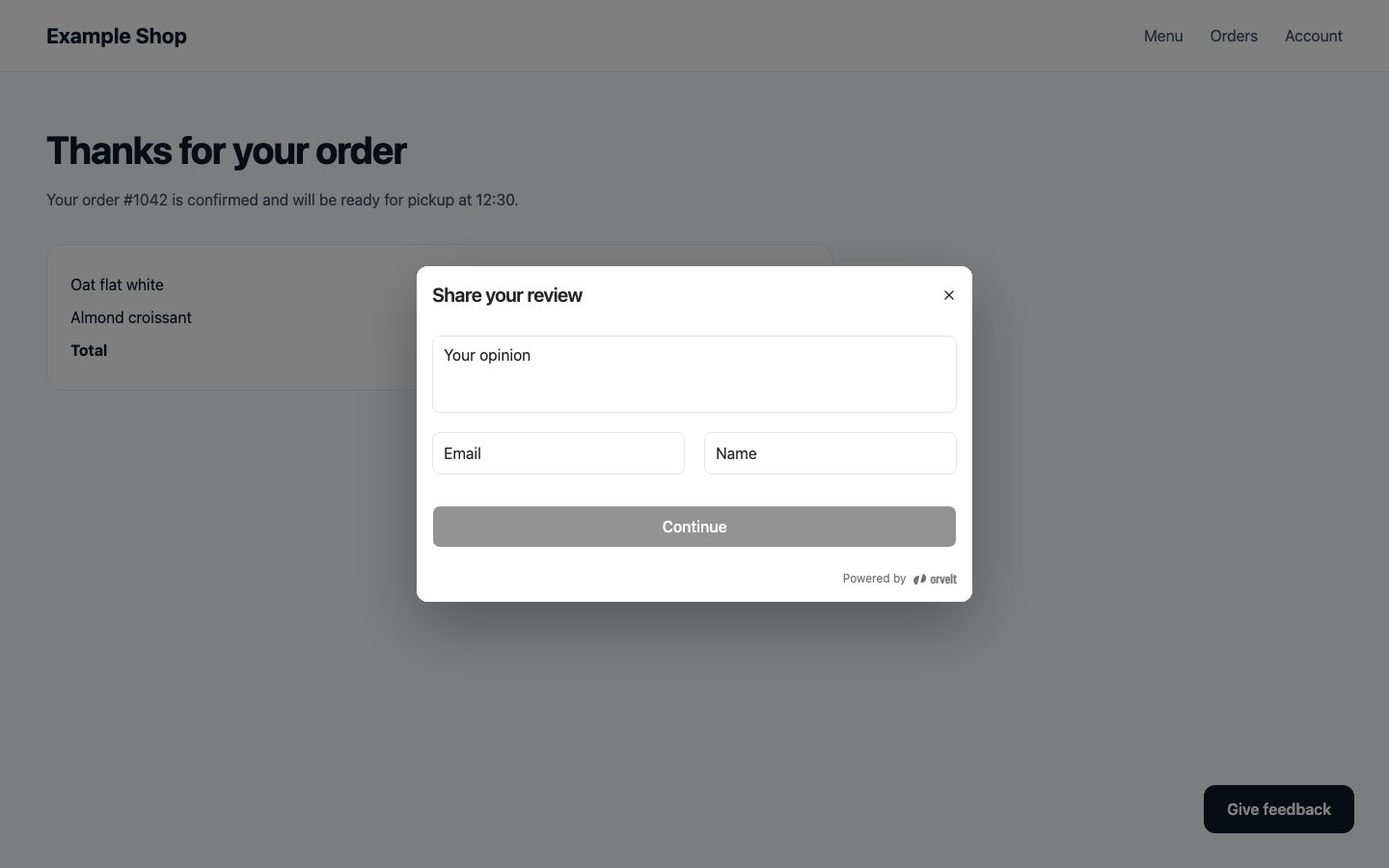
The website form brings Orvelt's opinion form, including your questions, onto your own website. Customers type or speak their opinion without leaving your site. The best places for it are moments when customers have just finished something: an order confirmation page, a booking confirmation, or a Give feedback button in your footer.
You don't need a developer if your site is built with Shopify, Wix, Squarespace, WordPress, Webflow, or a similar website builder. Copy one block, change one value, and paste it into your site.
Choose how the form appears
Your page shows a Give feedback button. Selecting it opens the form in a pop-up window over your page. Best for footers, menus, or account pages, where the form shouldn't take up space until someone wants it.
Before you paste: three things to check
Your project is published
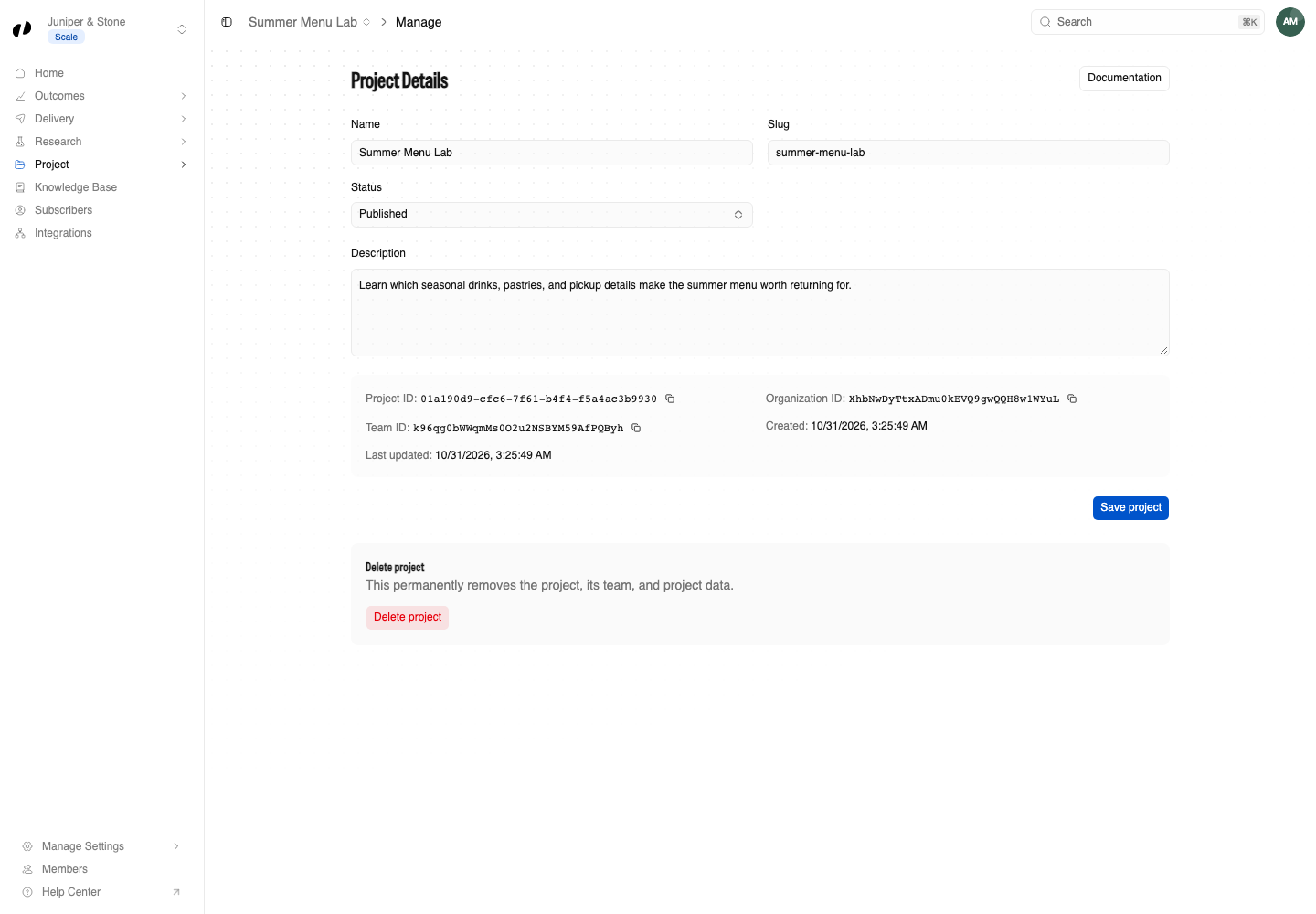
The form collects opinions for one project. Open the project, choose Project → Manage, and check its Status is Published. Project settings
Copy your Project ID
On the same Project → Manage page, find Project ID and select its copy button. It's a long code like 0194f3a2-7c1e-7b55-9d1a-2f6c8e4b1a90. You'll paste it into the block below.
Decide which websites may show it
By default, any website can show your form. You can limit it to your own site under Delivery → Embedded form → Allowed origins. If you're not sure, leave it empty for now. Allowed origins
The block to paste
Copy the block for the option you chose. Then replace PASTE-YOUR-PROJECT-ID-HERE with your Project ID, keeping the quote marks around it. That's the only change you need to make.
<button id="orvelt-feedback-button" type="button">Give feedback</button>
<script src="https://unpkg.com/@orvelt/business/dist/opinion-embed.js"></script>
<script>
  (function () {
    var form = OrveltEmbed.configure({
      projectId: 'PASTE-YOUR-PROJECT-ID-HERE',
      visibility: 'public',
    });
    document.getElementById('orvelt-feedback-button').addEventListener('click', function () {
      form.open();
    });
  })();
</script>
You can change the words Give feedback to anything you like, such as "Tell us how we did".
Want private feedback instead of public reviews?
Change 'public' to 'private'. Private feedback is only visible to your business and never appears on your Storefront. A form for a private project always collects private feedback, whichever value you use.
visibility value | What customers write |
|---|---|
'public' | Public reviews that can appear on your Storefront. |
'private' | Private feedback only your business can read. |
Where's the code in Orvelt Business?
Delivery → Embedded form → Embed code shows a version of this code written for developers who build their site with JavaScript tools. If you use a website builder, use the block on this page instead. It does the same thing and can be pasted anywhere HTML is allowed.
Paste it into your website
Pick your website builder for step-by-step instructions:
Shopify
Add a Custom Liquid section in the theme editor.
Wix
Add an Embed HTML element in the Wix editor.
Squarespace
Add a Code Block to any page.
WordPress
Add a Custom HTML block in the block editor.
Webflow
Add a Code Embed element in the Designer.
Using something else? Look for a block or element called HTML, Embed, Code, or Custom code in your website builder, add it where you want the form, and paste the block into it. If your site was built by a developer, send them this page and the developer guide.
After you paste
Test the form with a real submission before you tell customers about it.
How customers sign in
Customers already signed in to Orvelt post as themselves. Everyone else enters their name and email and confirms a code sent to that email before writing, so you always know who you're hearing from. It all happens inside the form; your website doesn't handle any sign-ins or passwords.
Match your brand
Set the form's accent color, rounded corners, and dark mode by adding a few lines to the same block. Customize the form
Attaching an order number or reacting when someone submits needs a developer. Developer guide: Website embed